

Key Takeaways
- RAM determines how many tasks your laptop can handle simultaneously without slowing down.
- Storage determines how much data - files, apps, photos - your laptop can permanently hold.
- Both are measured in gigabytes (GB), which is why they're commonly confused.
- Running low on RAM causes slowdowns; running low on storage prevents saving new files.
- For most users, 16GB of RAM and 256GB or more of storage is a practical starting point.
- Upgrading RAM is sometimes possible; storage upgrades depend on your laptop model.
Option A
RAM (Random Access Memory)
Your laptop's short-term working memory.
Best for: Handling tasks actively in progress - keeping tabs, apps, and processes running smoothly right now.
Option B
Storage
Your laptop's long-term filing cabinet.
Best for: Holding all your files, apps, and the operating system permanently, even when the laptop is powered off.
If you multitask heavily - many browser tabs, streaming, and apps open at once
RAM (Random Access Memory)
More RAM lets your laptop juggle more active tasks without stuttering or freezing. Prioritize at least 16GB if multitasking is part of your daily workflow.
If you store large files like videos, photos, or a large music library
Storage
High-capacity storage ensures you have room for everything without constantly deleting files or relying on external drives.
If you work primarily in a browser and use cloud services like Google Drive or OneDrive
RAM (Random Access Memory)
Cloud-based workflows reduce the need for large local storage, but keeping many browser tabs open demands sufficient RAM.
If you need a laptop for basic tasks - email, documents, and occasional video calls
Storage
Basic use doesn't push RAM limits, but adequate storage (256GB+) gives you comfortable room for your operating system, apps, and documents.
Why These Two Specs Get Confused
When shopping for a laptop, you'll see both RAM and storage measured in gigabytes (GB). That shared unit of measurement is the root of most confusion - but the two components serve entirely different purposes and affect your experience in distinct ways.
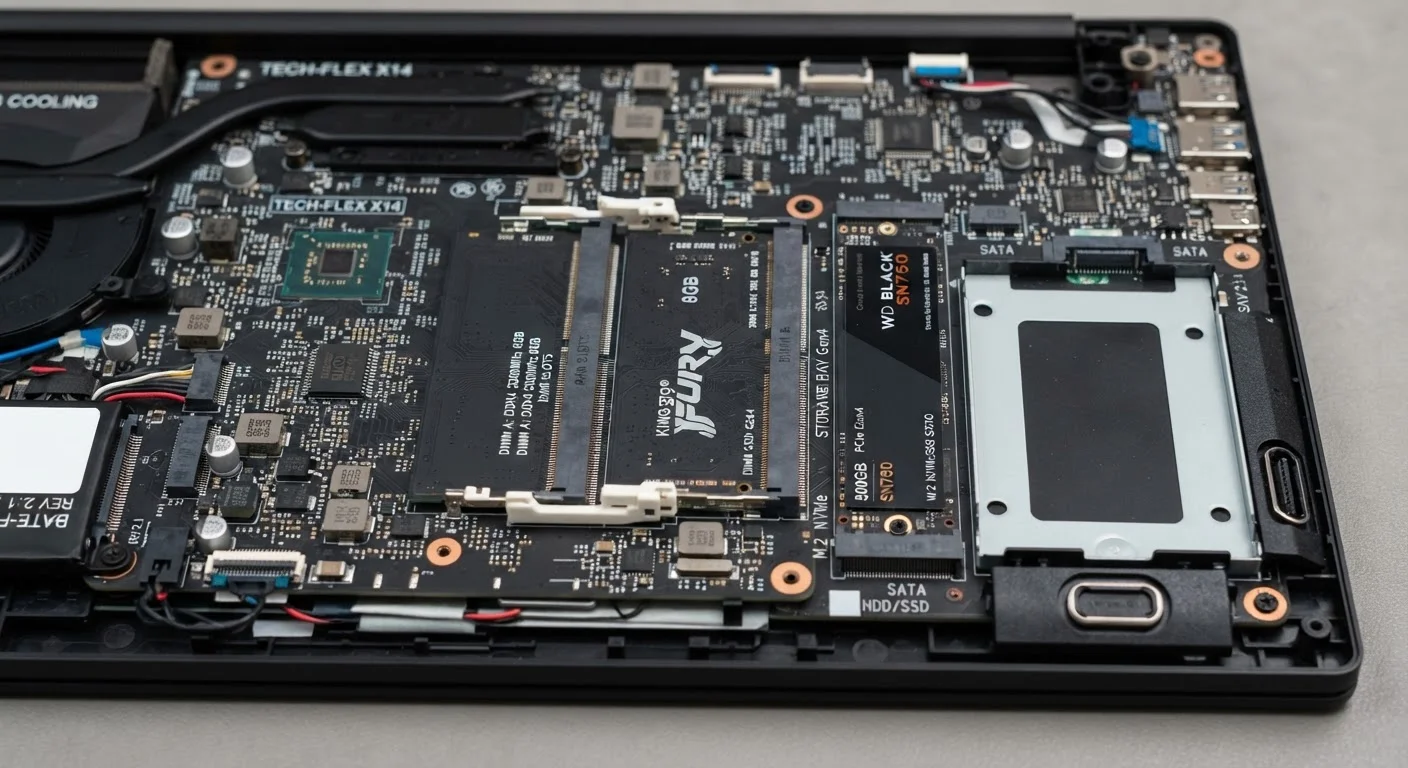
Think of your laptop like a physical workspace. Storage is the filing cabinet where everything lives permanently: your operating system, installed apps, photos, documents, and downloads. RAM is the surface of your desk - the space where you actively work. The bigger the desk, the more projects you can spread out and work on simultaneously without constantly shuffling things in and out of the cabinet.
For a deeper look at how these components fit into the broader picture of laptop specs, see our full laptop specs guide.
| Criterion | RAM | Storage |
|---|---|---|
| Primary function | Active working memory | Permanent data holding |
| Retains data when powered off? | No - clears on shutdown | Yes - persists indefinitely |
| Typical consumer range | 8GB - 64GB | 128GB - 2TB+ |
| Impact when full | System slowdown and lag | Cannot save new files |
| Speed | Extremely fast | Fast (SSD) or slower (HDD) |
| Upgradeable in laptops? | Sometimes - model dependent | Often - but not always |
| Affects multitasking? | Directly and significantly | Indirectly, via swap usage |
How RAM Affects Day-to-Day Performance
RAM is active memory - it holds the data your processor is currently working with. When you open a browser with a dozen tabs, launch a video call, and keep a document open at the same time, all of that lives in RAM. If your RAM fills up, your laptop starts using a portion of your storage drive as temporary overflow (called a page file or swap space). Storage is far slower than RAM, so this causes the sluggish, unresponsive behavior many users attribute to an old or underpowered machine.
16GB
RAM recommended for mainstream multitasking
Industry guidance from major PC manufacturers suggests 16GB as the practical sweet spot for general productivity and light creative work.
~5x
Speed advantage of RAM over SSD storage
RAM operates at speeds many times faster than even high-performance SSDs, explaining why relying on storage as overflow memory causes noticeable slowdowns.
For most general-purpose laptop use in the current market, 8GB of RAM is a minimum baseline, with 16GB offering noticeably more headroom. Video editing, running virtual machines, or heavy creative software can benefit from 32GB or more. If you're considering an upgrade later, check out our honest look at when upgrading RAM actually helps.
How Storage Affects What You Can Keep and How Fast Things Load
Storage is where your laptop keeps everything when it isn't actively in use - and when the machine is powered off. Two main types are common in laptops today: HDD (hard disk drive) and SSD (solid-state drive). SSDs are significantly faster, quieter, and more durable than HDDs, which is why most modern laptops ship with them. The type of storage affects how quickly your laptop boots up and how fast apps launch, even if the total capacity is the same.
Running low on storage doesn't slow your machine the way low RAM does - instead, you simply can't save new files or install new software until you free up space. A 128GB SSD can fill up quickly once your operating system, apps, and a modest photo library are factored in. For most users, 256GB is a more comfortable floor, and 512GB gives room to grow. To understand the SSD vs. HDD tradeoff in more detail, see how your laptop stores data and why it matters.
Cloud Storage Is Not the Same as Local Storage
Services like Google Drive, iCloud, and Dropbox store your files on remote servers, not on your laptop's internal drive. While they reduce the demand on local storage, they require a reliable internet connection to access your files. They do not affect - or replace - your laptop's RAM in any way. It's worth treating cloud storage as a complement to local storage, not a substitute for it.
Which Should You Prioritise When Buying?
The honest answer is that both matter - but they matter in different ways depending on how you use your laptop. A machine with ample storage but insufficient RAM will feel slow and unresponsive when multitasking. A machine with generous RAM but cramped storage will run smoothly but constantly prompt you to delete files.
If your work involves keeping many apps or browser tabs open at once, lean toward more RAM. If you handle large files, shoot video, or rarely use cloud services, prioritize storage capacity. For cloud-first users who store most data remotely, a smaller SSD paired with solid RAM is often a practical balance.
Worth noting: many modern thin-and-light laptops solder RAM directly to the motherboard, making post-purchase upgrades impossible. Storage is more often upgradeable, though not always. Check upgrade options before purchasing if future-proofing matters to you. Our guide on adding more RAM to your computer covers what to check before you buy.
For a comprehensive overview of all the specs you'll encounter - including CPU speed and cores - see our plain-language primer for upgraders.