

Key Takeaways
- Local processing keeps data on-device, offering faster responses and offline functionality.
- Cloud processing enables smarter features but depends on a stable internet connection.
- Your privacy exposure differs significantly between the two approaches.
- Many modern smart home devices use a hybrid of both methods.
- The right choice depends on your priorities: speed, privacy, features, or reliability.
Our Verdict
Neither local nor cloud processing is universally superior - each reflects a deliberate design trade-off. Local processing excels in speed, privacy, and resilience, while cloud processing enables richer intelligence and cross-device coordination. For most households, a hybrid setup that leans on local processing for critical functions and cloud for advanced features strikes the most practical balance.
| Best for | Recommended |
|---|---|
| Privacy-conscious users and those in areas with unreliable internet | Local Processing |
| Users who want advanced AI features and seamless remote access | Cloud Processing |
| Most households balancing everyday convenience with reliability | Hybrid (Local + Cloud) |
What Local and Cloud Processing Actually Mean
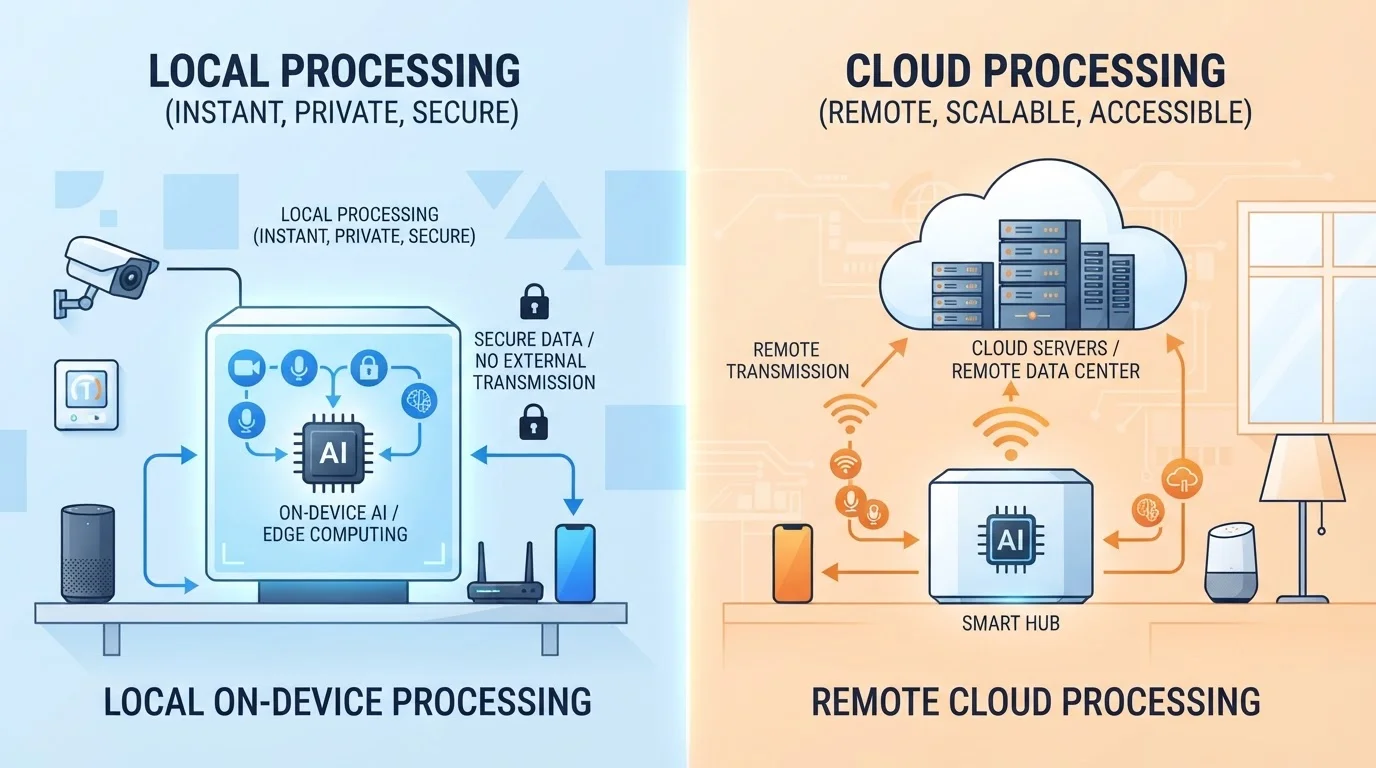
Every time you speak a command or trigger a smart home automation, your device has to interpret that input somewhere. Local processing means the computation happens entirely on the device itself - or on a hub sitting in your home - without sending data to an external server. Cloud processing means that data is transmitted over the internet to remote servers, processed there, and a response is sent back.
The distinction matters more than it might appear. It determines how fast your device responds, what happens when your Wi-Fi goes down, and who has access to recordings or usage data. For a deeper look at how hubs factor into this equation, see smart home hub vs. direct Wi-Fi device differences.
Speed, Latency, and Everyday Responsiveness
Local processing has a clear edge in response time. Because the device doesn't need to make a round trip to a data center, commands execute in milliseconds. This matters most for time-sensitive tasks - triggering a security alarm, adjusting lighting in response to motion, or running a voice command when you want an immediate reaction.
Cloud-dependent devices introduce latency that's partly governed by your internet connection quality and server load. On a fast, stable connection, the delay is often imperceptible. But during network congestion or outages, cloud-processed devices may slow noticeably or stop responding entirely. 5G and mobile data connectivity can reduce that latency for mobile-connected devices, though home smart devices predominantly rely on Wi-Fi.
~100ms
Typical cloud round-trip latency
Network engineers commonly cite 80-150ms as a realistic round-trip time for cloud API calls on a typical broadband connection, excluding processing time.
<10ms
Typical local processing response time
On-device or local-hub processing eliminates the internet transit step, with responses often completing in single-digit milliseconds.
Privacy: Who Sees Your Data and Where It Goes
Privacy is where the gap between these two approaches becomes most significant. With local processing, your voice recordings, sensor readings, and usage patterns typically never leave your home network. There's no third-party server storing a log of when you turned on your lights or what you said to your assistant.
Cloud processing requires transmitting that data externally. Depending on the manufacturer's privacy policies, that data may be retained, analyzed to improve services, or - in some cases - shared with partners. It's worth reading a device's privacy policy before purchase, particularly for devices with always-on microphones or cameras.
This trade-off mirrors the broader local-versus-cloud data debate. local vs. cloud storage trade-offs apply in similar ways across many categories of personal technology. For practical steps on securing your connected devices regardless of which processing model they use, see smart home security guidance.
Cloud Dependency Can End Unexpectedly
Smart home devices that rely entirely on a manufacturer's cloud servers become non-functional if that company shuts down its service or discontinues support for older hardware. This has happened with several smart home platforms. Before purchasing cloud-dependent devices, check whether the manufacturer offers any local control fallback or has an established track record of long-term support.
Features, Intelligence, and What the Cloud Makes Possible
Cloud processing isn't simply a privacy trade-off - it genuinely enables capabilities that local hardware often can't match. Complex natural-language understanding, continuous learning from user behavior, and integration across many devices in different locations all benefit from cloud infrastructure. Voice assistants that can answer nuanced questions, security cameras that distinguish a person from a tree branch, and thermostats that adapt to seasonal patterns rely heavily on server-side processing power.
Local-only devices are constrained by the processing chip built into the hardware. As AI models grow more sophisticated, manufacturers are increasingly pushing more intelligence to the device itself through dedicated NPU chips - but cloud-connected devices still tend to offer more advanced, regularly updated feature sets.
| Local Processing | Cloud Processing | |
|---|---|---|
| Response Speed | Very fast, near-instant | Depends on internet latency |
| Works Without Internet | Yes, fully functional | Limited or non-functional |
| Privacy Exposure | Data stays on-device | Data sent to external servers |
| Feature Sophistication | Limited by onboard hardware | Richer AI and learning capabilities |
| Remote Access | Requires extra configuration | Built-in via manufacturer app |
| Update Dependence | Firmware updates only | Features can update server-side |
Offline Reliability and What Happens During an Outage
One of the most practical reasons to consider local processing is resilience. Devices that process commands on-device continue working even when your internet connection drops. Routines, automations, and manual controls all function normally. For households that experience frequent outages - or simply want critical smart home functions like door locks or alarms to remain operational - this is a meaningful advantage.
Cloud-dependent devices range widely in how gracefully they handle connectivity loss. Some cache recent settings and maintain basic function; others go effectively offline and display error states until the connection restores. When evaluating a smart home setup, it's worth asking which functions are essential and whether they'll keep working without internet access. Understanding your full smart home device categories and their roles helps you identify which devices merit prioritizing local capability.
Audit Your Critical Devices First
Before expanding your smart home, identify which devices serve safety or security functions - locks, alarms, smoke detectors. Prioritize local processing or hybrid models for those, so a router reboot or ISP outage doesn't leave your home vulnerable. Less critical devices like smart bulbs or entertainment systems can tolerate cloud dependency more comfortably.