

Key Takeaways
- A single router works well in smaller homes or open floor plans where the signal reaches every room.
- Mesh networks shine in larger homes, multi-story layouts, or spaces with thick walls that block Wi-Fi.
- Mesh systems cost significantly more upfront but eliminate dead zones without running ethernet cables.
- A single router is simpler to configure and manage, while mesh systems offer more seamless roaming.
- Your internet plan's speed tier matters less than signal quality at the point of use.
Our Verdict
For most apartments and smaller single-story homes, a capable single router delivers reliable performance without unnecessary complexity or cost. In larger homes, multi-story layouts, or spaces with structural interference, a mesh system is the more practical long-term investment. Neither setup is universally superior - the right choice depends squarely on your square footage, home layout, and how many devices you need to support.
| Best for | Recommended |
|---|---|
| Smaller homes, apartments, or open floor plans | Single Router |
| Larger homes, multi-story buildings, or homes with dead zones | Mesh Network |
| Budget-conscious setups with minimal technical overhead | Single Router |
| Whole-home coverage with seamless device roaming | Mesh Network |
How Each Setup Works
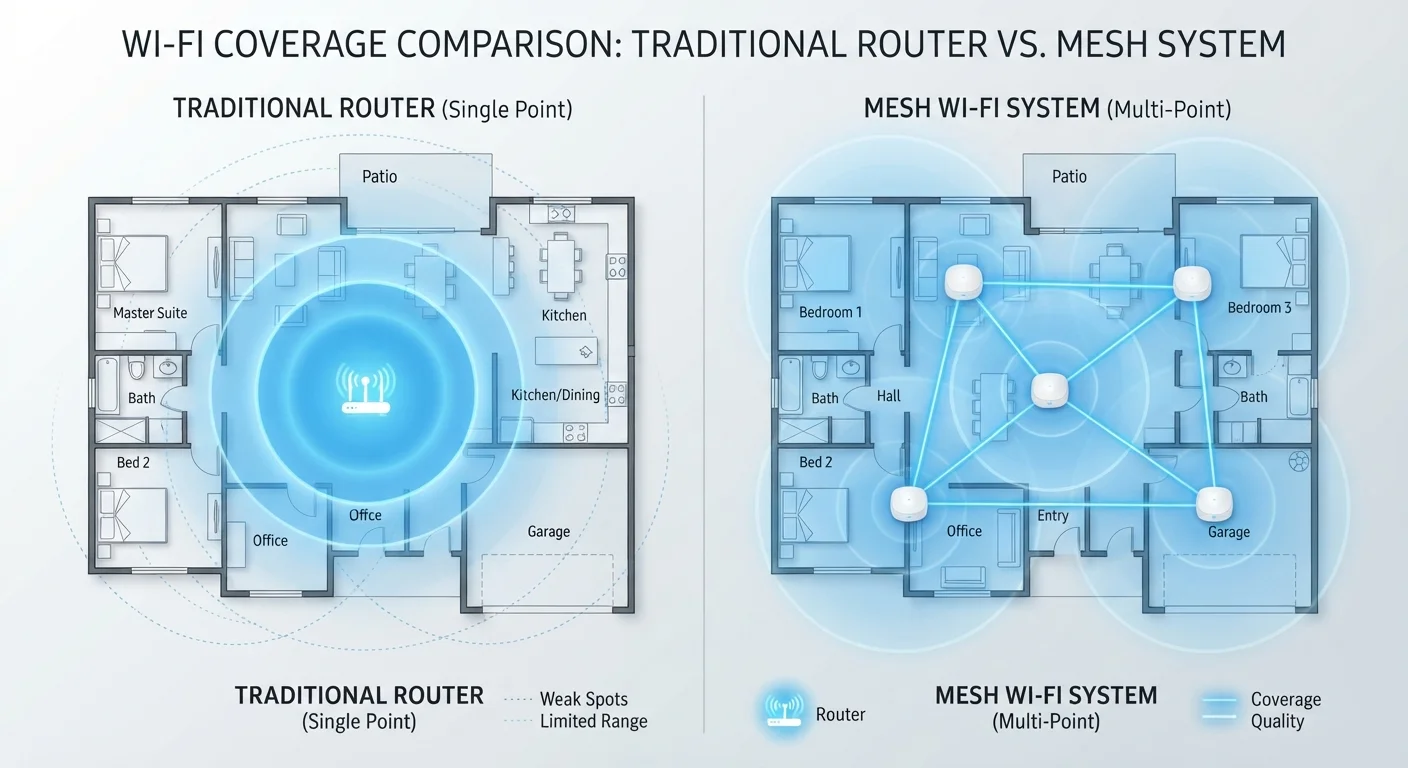
A single router connects directly to your modem and broadcasts a Wi-Fi signal from one fixed point. Everything in your home connects back to that single source. For a primer on how routers and modems work together, see Router vs. Modem: Why Your Home Network Needs Both.
A mesh network replaces - or supplements - that single router with a system of two or more nodes. One node connects to the modem and acts as the primary gateway; the others are placed around the home and communicate with each other to form a unified network. Devices roam between nodes automatically as you move through your space. For a deeper technical breakdown, Mesh Wi-Fi Systems Explained covers the technology in full.
Coverage, Speed, and Real-World Performance
Wi-Fi signal degrades with distance and physical obstructions. Concrete walls, floor joists, appliances, and even large furniture absorb or reflect radio waves. A single router placed centrally in a 1,000-1,500 sq ft open-plan home can realistically blanket the entire space. But in a 2,500+ sq ft home - especially one with multiple floors or older construction - signal at the far end often drops to a fraction of what your internet plan delivers.
Mesh nodes close that gap by placing signal sources closer to where devices actually are. The trade-off is backhaul: nodes need to talk to each other, and a wireless backhaul (nodes communicating over Wi-Fi) consumes bandwidth that could otherwise serve your devices. A wired backhaul - running ethernet between nodes - eliminates that overhead and produces performance closer to a single router's consistency.
| Single Router | Mesh Network | |
|---|---|---|
| Ideal home size | Up to ~1,500 sq ft | 1,500 sq ft and above |
| Setup complexity | Low - plug in and configure | Moderate - node placement required |
| Upfront cost | Lower | Higher (multiple nodes) |
| Dead zone handling | Limited to signal range | Designed to eliminate dead zones |
| Device roaming | Manual band/network switching | Automatic seamless handoff |
| Wired backhaul option | N/A - single device | Yes, improves performance significantly |
| Management interface | Browser-based or app | Primarily app-based |
Understanding how your router manages the 2.4 GHz and 5 GHz bands also affects real-world speeds. See 2.4 GHz vs 5 GHz Wi-Fi: Choosing the Right Band for Each Room for guidance on optimizing band selection per device.
Cost and Complexity
A capable single router typically costs less than the entry price of a two-node mesh kit. For straightforward setups, that cost gap is hard to justify. Mesh systems also introduce more configuration surface area: app-based management, firmware updates across multiple nodes, and node placement decisions all add steps that a single-router setup avoids.
That said, the alternative to mesh in a large home is often a Wi-Fi extender - a common but imperfect solution. Extenders create a separate network name, require manual device switching, and cut available bandwidth in half on older designs. They are cheaper than mesh but generally less effective. The Case For and Against Upgrading to a Mesh Wi-Fi System explores this comparison in more depth.
Placement Makes a Major Difference
Regardless of which setup you choose, router or primary mesh node placement is critical. Position the device in a central, elevated, open location - not inside a cabinet or behind a TV. For mesh systems, place satellite nodes halfway between the primary node and your dead zone, not at the dead zone itself. Signal needs to reach the node before it can rebroadcast.
Choosing Based on Your Home
Use these factors as a practical decision framework:
- Square footage under 1,500 sq ft: A single router is almost always sufficient, provided it's placed centrally and not buried in a closet.
- Multi-story home or 2,000+ sq ft: Mesh coverage is worth the investment, particularly if running ethernet between floors is impractical.
- Older construction with thick walls: Dense materials dramatically reduce range; mesh nodes bypass the problem by shortening the signal path.
- High device count: Homes with 30+ connected devices benefit from mesh systems that distribute the processing load across multiple nodes.
- Renting or moving soon: A single router is easier to relocate and doesn't require re-optimizing node placement in a new space.
For broader context on building a reliable home network from the ground up, Everything You Need to Know About Home Networking covers every layer of the stack.