
Integrated vs. Dedicated Graphics: When Does a Separate GPU Actually Help?

Key Takeaways
- Integrated graphics share system memory with the CPU and handle everyday computing tasks efficiently.
- Dedicated GPUs have their own video memory and deliver significantly higher graphical performance.
- For most browsing, streaming, and office work, integrated graphics are entirely sufficient.
- Gaming, video editing, and 3D rendering benefit meaningfully from a dedicated GPU.
- Dedicated GPUs consume more power and typically add cost, weight, and heat to a laptop.
- Modern integrated graphics - especially recent AMD and Intel generations - are more capable than ever before.
Option A
Integrated Graphics
The built-in, energy-efficient everyday solution.
Best for: Users who browse, stream, use productivity apps, and want longer battery life from a thinner, lighter laptop.
Option B
Dedicated Graphics (Discrete GPU)
The separate, performance-focused graphics powerhouse.
Best for: Users who game, edit video, work with 3D models, or run other visually demanding applications regularly.
If your daily tasks include web browsing, email, streaming, and document editing
Integrated Graphics
Integrated graphics handle all of these tasks without any performance penalty, while keeping the laptop lighter, cooler, and longer-lasting on a charge.
If you play modern PC games at medium or high settings
Dedicated Graphics (Discrete GPU)
Most current games require more graphical horsepower than integrated GPUs can deliver, especially at higher resolutions or frame rates.
If you edit video, work with 3D models, or use creative production software
Dedicated Graphics (Discrete GPU)
Dedicated GPUs accelerate rendering and export tasks substantially, cutting down waiting time in professional creative workflows.
If portability and all-day battery life are your top priorities
Integrated Graphics
Discrete GPUs draw considerably more power, which reduces battery life - often significantly - compared to integrated-only machines.
If you occasionally dabble in light photo editing or casual older games
Integrated Graphics
Modern integrated graphics - particularly recent Intel Arc and AMD Radeon integrated solutions - can handle light creative tasks and older or less-demanding titles comfortably.
What Each Type of Graphics Actually Does
Every laptop needs a GPU - a graphics processing unit - to render what appears on screen. Where that GPU lives and how it operates is what separates integrated from dedicated graphics.
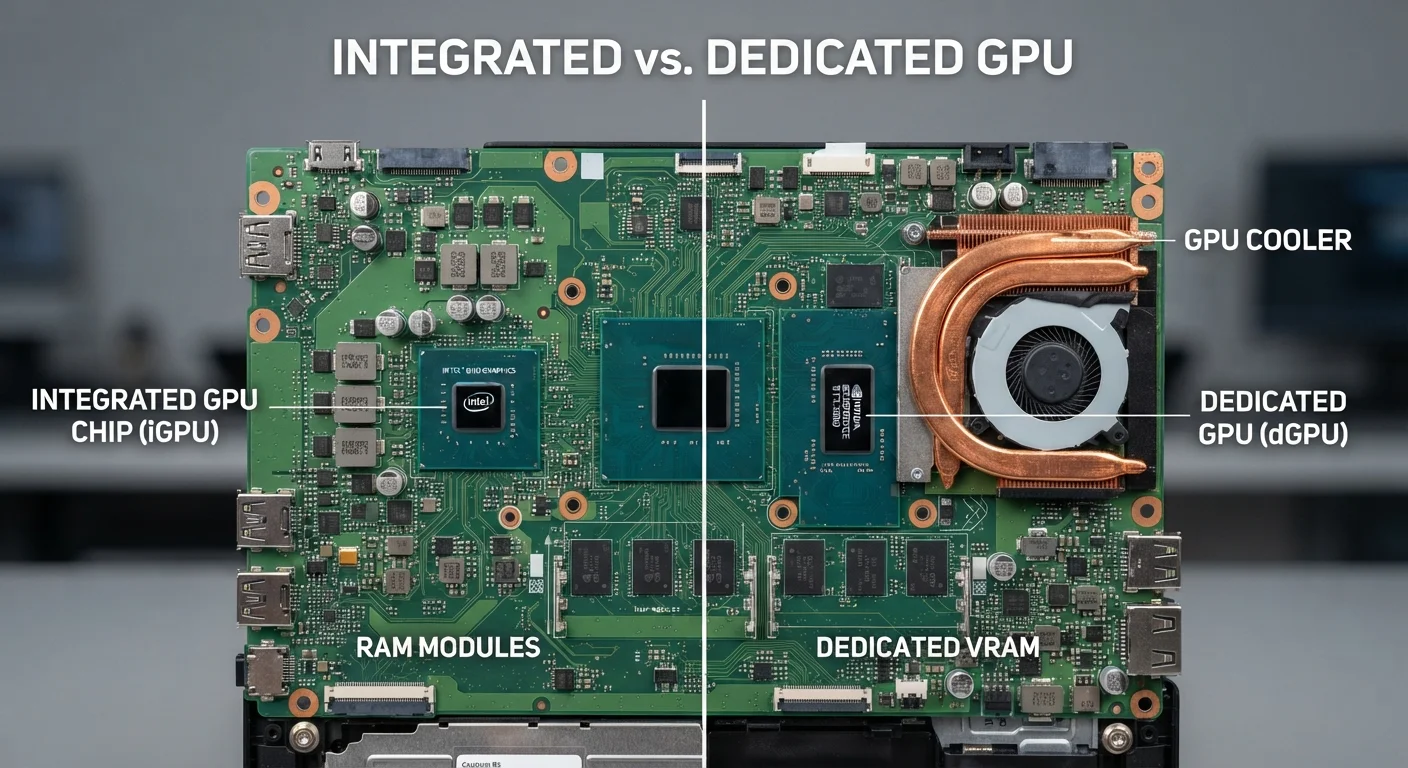
Integrated graphics are built directly into the same chip as your processor (CPU). They share the computer's regular system memory (RAM) rather than having their own pool of dedicated video memory. Because everything is packed onto one chip, integrated graphics are power-efficient and generate less heat - ideal for slim, portable designs.
Dedicated graphics (also called discrete GPUs) are separate chips with their own VRAM - memory specifically reserved for graphics tasks. That separation means the GPU isn't competing with the rest of the system for memory bandwidth, allowing it to handle much more graphically complex work.
For context on how these choices ripple into a laptop's overall design and portability, see our guide to thin-and-light vs. performance laptops.
| Criterion | Integrated Graphics | Dedicated Graphics |
|---|---|---|
| Location | Built into CPU chip | Separate chip on laptop board |
| Video Memory | Shares system RAM | Dedicated VRAM (own pool) |
| Graphical Performance | Sufficient for everyday tasks | High - handles demanding workloads |
| Battery Impact | Minimal - power-efficient | Notable - higher power draw |
| Heat Output | Lower - runs cooler | Higher - requires more cooling |
| Laptop Size & Weight | Enables thinner, lighter designs | Typically adds bulk and weight |
| Cost | Lower - included in CPU cost | Higher - significant price addition |
| Best Use Cases | Browsing, streaming, productivity | Gaming, video editing, 3D work |
When Integrated Graphics Are Enough
The honest answer for most consumers: integrated graphics are enough. If your laptop use covers web browsing, video calls, streaming services, word processing, spreadsheets, and presentations, a dedicated GPU adds cost and weight without adding any perceptible benefit.
Modern integrated graphics have advanced considerably. Recent generations from both Intel and AMD can handle 4K video playback smoothly, light photo editing in tools like Lightroom, and even casual older or less-demanding games. For students, remote workers, and general home users, an integrated GPU paired with a capable processor often represents the smarter trade-off.
Battery life is a major factor here. Discrete GPUs consume meaningfully more power - even when idle, they contribute to thermal output. Laptops with integrated-only graphics routinely achieve longer battery life in comparable usage scenarios, which matters significantly if you work away from an outlet.
~10-20%
Typical GPU performance gap for casual tasks
Independent hardware reviewers broadly find integrated GPUs handle non-gaming workloads within a narrow margin of dedicated GPUs for everyday applications like 4K streaming and light editing.
15-30%
Potential battery life reduction with discrete GPU
Laptop reviews consistently note that discrete GPU models of the same chassis tend to achieve shorter real-world battery life due to higher power consumption, even during light use.
When a Dedicated GPU Makes a Real Difference
There are specific workloads where dedicated graphics shift from a luxury to a practical necessity:
- PC gaming: Most modern titles at medium-to-high settings and 1080p or above require the raw throughput that only a discrete GPU can deliver. Integrated graphics will often struggle with frame rates, forcing lower quality settings or resolutions.
- Video editing and export: Applications like Adobe Premiere Pro and DaVinci Resolve can use GPU acceleration to dramatically speed up rendering and export times. A dedicated GPU can reduce a 30-minute export to a fraction of that time.
- 3D modeling and CAD: Software used in architecture, engineering, and animation is designed to offload complex geometry calculations to dedicated graphics hardware.
- Machine learning tasks: Some data science and AI development workflows leverage GPU compute power, making a discrete GPU genuinely useful.
If your work or hobbies regularly touch any of these areas, the added weight and reduced battery life of a discrete GPU are practical trade-offs rather than unnecessary compromises. You might also want to review how other specs - particularly RAM and storage - interact with your GPU choice for these demanding tasks.
A Note on Laptop GPU Naming
Discrete laptop GPUs share names with their desktop counterparts but are not identical components. Laptop variants are engineered to operate within strict power and thermal limits, which means their performance differs - sometimes substantially - from a same-named desktop GPU. When comparing specifications across laptops, look beyond the GPU model name and check the configured power limit (TDP) where available, as this gives a more accurate picture of expected performance.
Making the Call for Your Situation
Start with your actual workload - not the workload you imagine having. A dedicated GPU in a laptop used primarily for email and Netflix is money spent on hardware that never gets used. Conversely, trying to run video production software on integrated graphics creates a daily frustration that no amount of other strong specs will fix.
Budget and portability are real constraints too. Laptops with discrete GPUs are typically heavier and more expensive than comparable integrated-only machines. If portability is essential, weigh whether the graphical performance gain justifies carrying a thicker, heavier machine every day. Our broader desktop vs. laptop comparison explores how these physical trade-offs play out across different lifestyles.
One practical middle ground: some laptops pair a power-efficient processor with a modest discrete GPU that activates only when needed, switching to integrated graphics during lighter tasks to preserve battery. This hybrid approach offers flexibility, though it adds complexity and cost compared to a straightforward integrated-only configuration.
Ultimately, the right graphics setup is the one that matches your real usage - not the spec sheet that looks most impressive on paper.