

Key Takeaways
- A single router suits compact spaces; mesh networks address coverage gaps in larger or complex floor plans.
- Mesh systems cost significantly more upfront but eliminate dead zones by distributing multiple nodes.
- Single routers are simpler to configure and manage; mesh systems handle roaming and band-switching automatically.
- Both architectures now support Wi-Fi 6 and Wi-Fi 6E, so speed potential is not a deciding factor alone.
- Network security hygiene matters regardless of which architecture you choose.
Option A
Single Router
The straightforward, cost-effective standard.
Best for: Smaller homes or apartments where one central device can reach every corner.
Option B
Mesh Network
The distributed solution for whole-home coverage.
Best for: Larger or multi-story homes where dead zones and signal drop-off are persistent problems.
If you live in an apartment or small single-story home
Single Router
A modern router placed centrally will cover the space without the added cost or complexity of a mesh system.
If your home is multi-story, over 2,000 sq ft, or has thick walls
Mesh Network
Distributed nodes eliminate signal dead zones that a single router physically cannot overcome regardless of its power.
If you want the simplest possible setup and management
Single Router
One device, one admin interface, and no inter-node communication to configure or troubleshoot.
If you move between rooms frequently with laptops or phones
Mesh Network
Mesh systems hand off your device seamlessly between nodes, maintaining connection quality as you move around.
If upfront cost is your primary constraint
Single Router
A capable single router costs a fraction of a multi-node mesh kit, making it the practical choice when budget is tight.
How Each Architecture Works
Understanding the structural difference between these two setups is the first step to choosing correctly. For a foundational overview of what routers actually do in your home, see our Home Networking from the Ground Up guide.
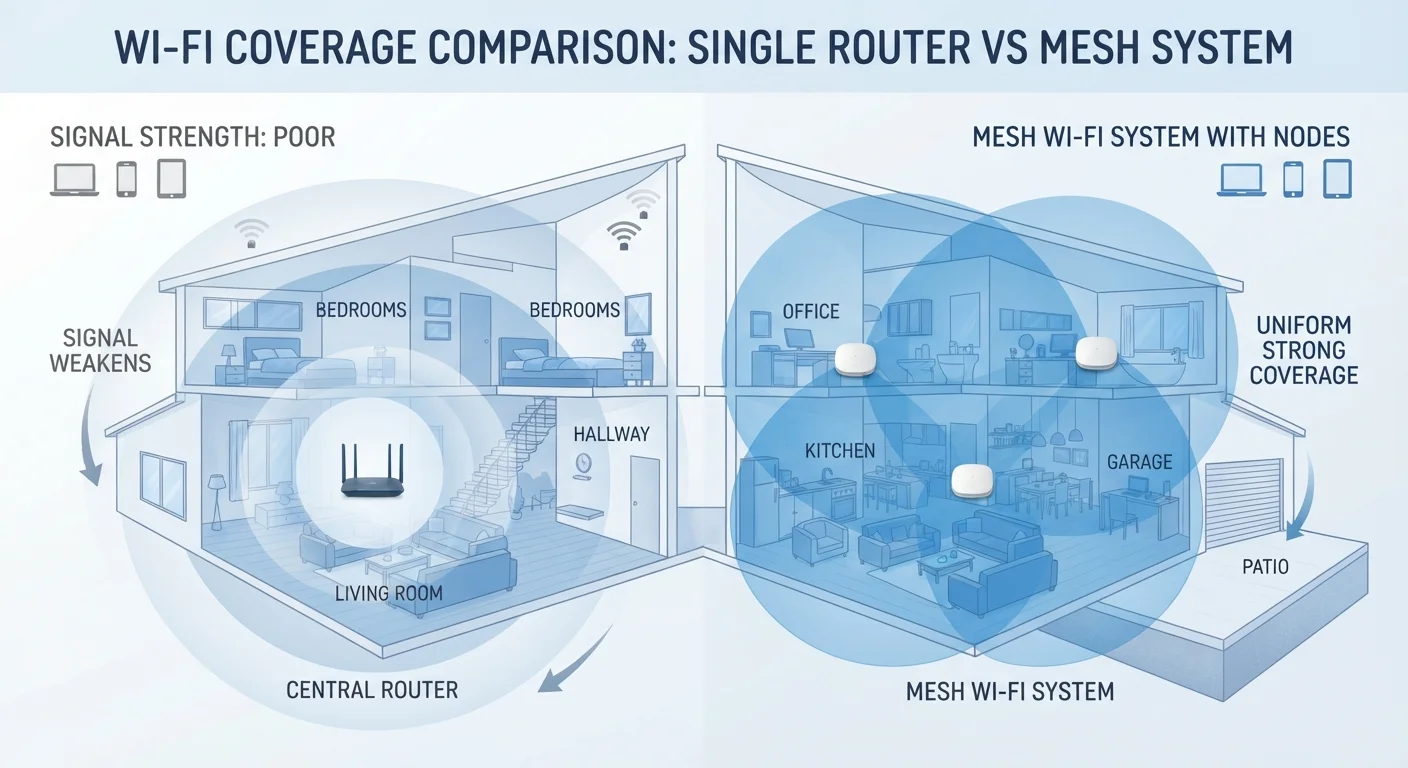
A single router is a standalone device — typically placed near your modem — that broadcasts a Wi-Fi signal in all directions from one fixed point. Signal strength diminishes with distance and degrades further when it must pass through walls, floors, or dense materials like concrete and brick.
A mesh network replaces that single point with a system of two or more nodes (sometimes called satellites or access points) placed strategically around your home. Each node communicates with the others, creating one unified network name (SSID). Your devices connect to whichever node offers the strongest signal and transition between nodes as you move — a process called seamless roaming. Learn more about how this technology works in our Mesh Wi-Fi Systems Explained article.
| Criterion | Single Router | Mesh Network |
|---|---|---|
| Coverage area | One fixed broadcast point | Distributed nodes, whole-home |
| Typical upfront cost | $80–$200 | $200–$500+ |
| Setup complexity | Low — single device | Moderate — app-guided multi-node |
| Seamless roaming | Not supported natively | Built-in across all nodes |
| Dead zone elimination | Limited by physics | Effectively addressed |
| Firmware management | One device to update | Each node requires updates |
| Wi-Fi 6 / 6E support | Available on modern models | Available on modern systems |
| Best home size | Up to ~1,500 sq ft | 1,500 sq ft and above |
Coverage, Cost, and Complexity Compared
Coverage is where the two architectures diverge most sharply. A single router in a 1,200 sq ft apartment can serve every room reliably. That same router in a 3,000 sq ft multi-level home will leave corners, garages, and back bedrooms with weak or no signal.
~30 ft
Typical 5 GHz signal range indoors
The 5 GHz band loses roughly half its range compared to 2.4 GHz when passing through walls, according to general RF propagation principles used in Wi-Fi planning.
2–3×
Typical cost multiplier for mesh vs. single router
Entry-level mesh kits start at approximately two to three times the price of a comparable single-router solution at similar Wi-Fi generations.
~30%
US homes larger than 2,000 sq ft
U.S. Census Bureau housing data indicates roughly 30% of owner-occupied homes exceed 2,000 square feet — a threshold where mesh coverage advantages become practical.
Cost is a meaningful trade-off. A capable single router typically runs $80–$200. An entry-level mesh kit with two or three nodes starts around $200 and can exceed $500 for premium systems. That premium buys coverage reliability — not necessarily faster speeds at the router itself.
Complexity cuts both ways. A single router is straightforward: one device, one settings panel, one firmware to update. Mesh systems are designed for easy setup through smartphone apps, but managing multiple nodes, checking backhaul connections (the link between nodes), and troubleshooting inter-node issues adds a layer of maintenance that single-router owners never encounter. For a balanced assessment of these trade-offs, see The Case For and Against Upgrading to a Mesh Wi-Fi System.
Performance Nuances Worth Knowing
Raw speed potential is often misunderstood in this comparison. Both single routers and mesh systems now support Wi-Fi 6 (802.11ax) and Wi-Fi 6E, so the architecture alone does not determine maximum throughput. What matters more is where you are relative to the transmitting node.
Mesh nodes that communicate over a dedicated wireless backhaul band — rather than sharing the same radio your devices use — preserve more bandwidth for client devices. Wired backhaul (running an Ethernet cable between nodes) is the most efficient approach but requires planning your home's cabling. For context on when a physical connection beats wireless, our Wired Ethernet vs Wireless Wi-Fi for Home Connections article covers the trade-offs clearly.
Single routers with external antennas or MU-MIMO technology can serve many devices simultaneously without significant speed degradation — an important consideration in homes with 20 or more connected devices. Understanding how Wi-Fi bands factor into device placement is also relevant here; our 2.4 GHz vs 5 GHz Wi-Fi guide explains those decisions in practical terms.
Wi-Fi Extenders: A Middle Ground Worth Noting
Range extenders (also called repeaters) sit between single routers and full mesh systems in both cost and capability. They rebroadcast an existing signal to extend range but typically create a separate network name and can halve available bandwidth. Modern mesh systems use dedicated backhaul to avoid this bandwidth penalty, making them a more efficient solution for homes that have already outgrown a single router.
Security Considerations for Both Setups
Network architecture also has security implications. A single router represents one device to update and one admin interface to secure — simpler to lock down and audit. Mesh systems expand the attack surface slightly: each node runs firmware that must be kept current, and the backhaul communication between nodes is an additional channel that, on reputable systems, is encrypted by default.
Regardless of which architecture you choose, core security practices apply equally: use WPA3 encryption where supported, change default admin credentials, enable automatic firmware updates, and segment IoT devices onto a separate guest network. Explore broader strategies at our Network Security hub. Neither architecture is inherently insecure — discipline in configuration matters more than the number of nodes on your network.